
App Setup
Setting Defaults
The options that every form shares are passed to createFormTreePlugin when the plugin is installed:
import { createFormTreePlugin } from '@formtree/vue'
import { createApp } from 'vue'
import App from './App.vue'

createApp(App)
  .use(createFormTreePlugin({ mode: 'onSubmit' }))
  .mount('#app')
The options that every form shares are passed to <FormTreeProvider> at the root of the app:
import { FormTreeProvider } from '@formtree/react'
import { ContactForm } from './contact-form'

export function App() {
  return (
    <FormTreeProvider mode="onSubmit">
      <ContactForm />
    </FormTreeProvider>
  )
}
The options that every form shares are kept in one object, which is passed to each createForm:
import type { FormDefaults } from '@formtree/core'

export const formDefaults: FormDefaults = {
  mode: 'onSubmit',
}import { createForm } from '@formtree/core'
import { formDefaults } from './form-defaults'
import { contactForm } from './forms/contact-form'
const form = createForm(contactForm, formDefaults)Every form starts from these options. Showing Errors and Submitting explain what each one does, and formatError set here translates the errors of every form, as Translating Errors shows.
Overriding a Default
An option given to a single form takes precedence over the default of the app:
<script setup lang="ts">
import { useForm } from '@formtree/vue'
import { contactForm } from './forms/contact-form'

const form = useForm(contactForm, { mode: 'onTouched' })
</script>import { useForm } from '@formtree/react'
import { contactForm } from './forms/contact-form'
export function ContactForm() {
const form = useForm(contactForm, { mode: 'onTouched' })
}import { createForm } from '@formtree/core'
import { formDefaults } from './form-defaults'
import { contactForm } from './forms/contact-form'
const form = createForm(contactForm, { ...formDefaults, mode: 'onTouched' })A mode set in a definition takes precedence over both.
Inspecting Forms in Devtools
Once the plugin is installed with createFormTreePlugin, every form created with useForm appears in Vue Devtools during development:
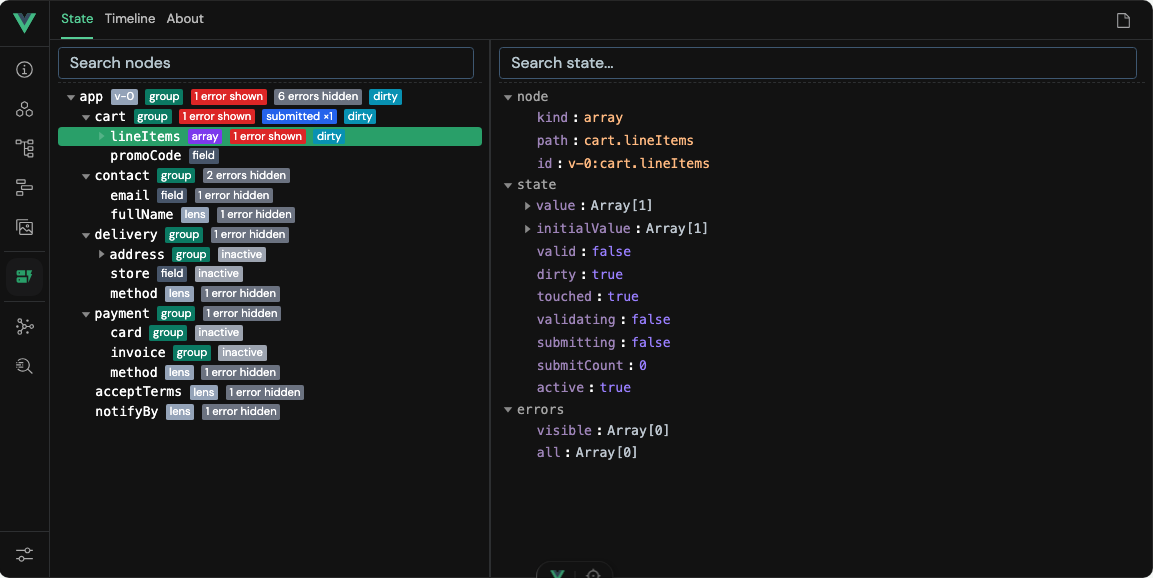
Tags show the kind and the state of each node, with errors counted as shown or hidden, and hovering a tag explains it. The inspector only reads, so every value and error still comes from the app.
Following Changes
The Timeline tab records every change, check, and submit while its record button is on:
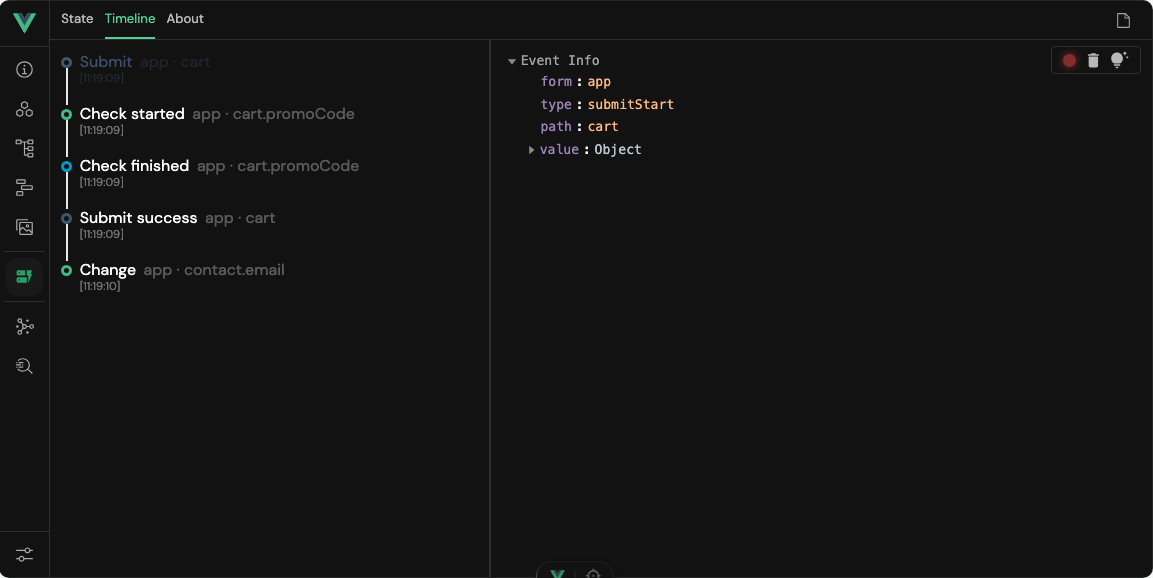
Selecting an event shows its path and the value at that path at that moment.
Turning Off the Devtools
Passing devtools: false keeps the forms out of Vue Devtools during development:
import { createFormTreePlugin } from '@formtree/vue'
import { createApp } from 'vue'
import App from './App.vue'

createApp(App)
  .use(createFormTreePlugin({ devtools: false }))
  .mount('#app')
Production builds leave the devtools out without this option.
The devtools come with the Vue adapter, because React DevTools offers no way for a library to add a panel of its own.
The devtools come with the Vue adapter and show forms in Vue Devtools, so a form built with the core alone does not appear in them.